
IRS Integration Guide

Welcome to IRS integration in FACTS Financial Aid Management. Learn and review the steps to complete the IRS Integration request.
Overview
FACTS is committed to making the financial aid process easier for schools and families. With IRS Integration, applicants can now securely retrieve their tax transcripts directly from the IRS, eliminating the need to manually scan, upload, or mail sensitive financial documents. This not only streamlines the application process for families but also reduces administrative work for schools and enhances data security. Keep reading for a step-by-step guide on how to get started with this new feature.

Eligiblity
FACTS will automatically determine eligibility and only offer this integration to eligible applications.
Eligible if:
|
Not Eligible if:
|
Step 1: How it Works
- IRS Integration banner
-
The new IRS Integration banner is displayed in the Application Summary.
 Note
NoteIf you have a co-applicant, be sure to provide required documents for both the applicant and co-applicant.
- Applicant: How it works
 Note
NoteTo get started, you will need to create or verify your IRS.gov account by clicking the link provided.
- Co-applicant: How it works
-
 Note
NoteIf you have a co-applicant, they’ll follow the same steps with their own IRS.gov account.
- IRS.gov account
-
Note
Create or verify your IRS.gov account.

NoteConfirm you have both an IRS.gov account and U.S. address to continue. If you have a co-applicant, they’ll need to do the same.
Step 2: Information Verification
- Applicant: Verify Information
-
Applicants must verify that their SSN, name, and address exactly match what’s on their IRS.gov account. Only individuals with a U.S. address are eligible. If you need help, click “How to find your info on IRS.gov” to check your account details.

- Co-applicant: Verify Information
-
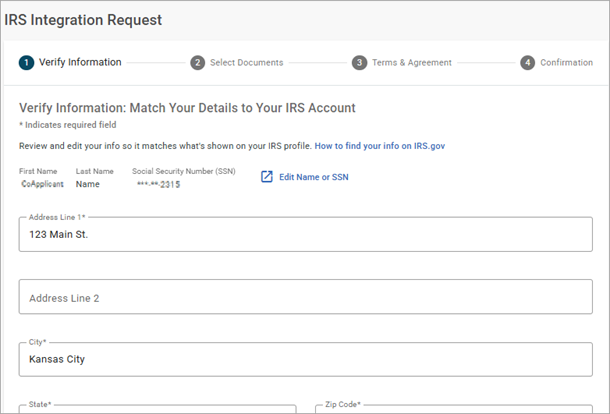 Note
NoteIf you’re completing this step as a co-applicant, the Co-Applicant’s name and SSN will be shown instead.
- Select Documents
-
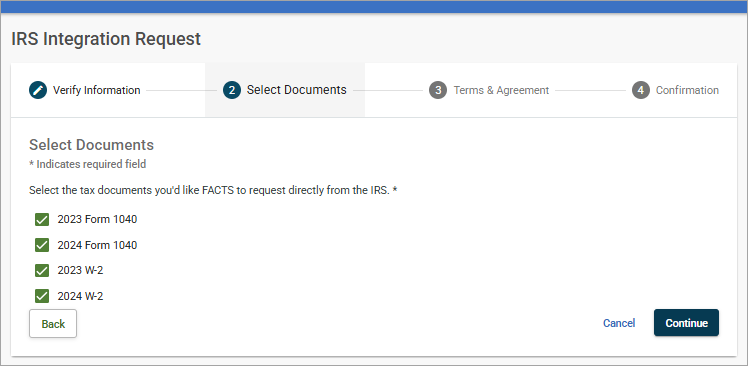 Check the boxes for the tax years you want to include with your application. Only documents available for the current applicant or co-applicant will be shown.
Step 3: Terms & Agreement
- Terms & Agreement
-
Applicant must type their name exactly as it appears on their application to submit their request. If their name doesn’t match, they’ll see a message letting them know the signature must match before they can click “Submit Request.”
If submitting for the co-applicant, the co-applicant’s name will display and must be entered as the electronic signature.
NoteThere is more than one tax professional authorized by the IRS. The requester may display as one of the following:
- Jim McGowan
- Elizabeth Boonin
- James Lee
- Erin Walker
 When submitting as a co-applicant, enter the co-applicant’s name as the signature.
Step 4: Confirmation
- Confirmation
-
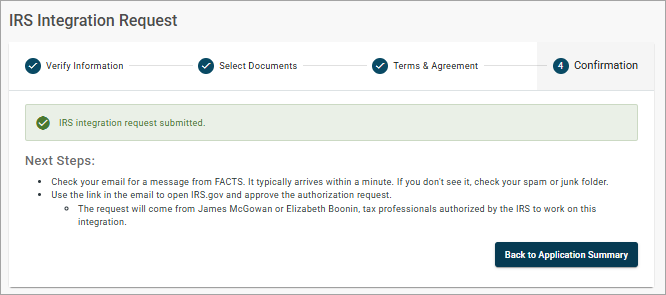
Once the request is submitted, the system will create an order for the IRS.
NoteThere is more than one tax professional authorized by the IRS. The requester may display as one of the following:
- Jim McGowan
- Elizabeth Boonin
- James Lee
- Erin Walker
Step 5: Email Notification
- Applicant: Request pending
-
On the Application Summary page, a notification will display stating the IRS integration request is pending.

- Co-applicant: Request pending
-
If you have a co-applicant, a separate IRS integration request will display under their name on the Application Summary page. You’ll see notifications for both the applicant and co-applicant, making it easy to track the status of each request.

- Action Required: Approve Request
-
The applicant will receive an email from FACTS with a subject line of Action Required: Approve Request. Click the button to go to the IRS.gov account to approve the request.
NoteThere is more than one tax professional authorized by the IRS. The requester may display as one of the following:
- Jim McGowan
- Elizabeth Boonin
- James Lee
- Erin Walker

Step 6: Approve Authorization
- Power of Attorney and Tax Information Authorizations
-
To approve the authorization on IRS.gov, applicants must go to Authorization. In the drop down, select Power of Attorney and Tax Information Authorizations. Click the Approve/Reject link to provide a response to the request.

- Approve Request
-
Click Approve Request. And that’s it! The applicant has now connected their IRS account to FACTS and streamlined the process of submitting required tax information.
