FACTS Incidental Billing Process for Families

Easy Payments are Here with FACTS
Making payments for incidental transactions has never been easier than with FACTS. Sign up for Auto Pay and have your payments deducted from your account with no hassle or make payments directly from your invoice by clicking “Make A Payment.” All you have to do is log into your FACTS account or call customer support at 866-441-4637.
Sample Incidental Invoice |
Sample Incidental Invoice with Auto Pay |
Note: If customers enrolled in Auto Pay do not take action to pay the invoice prior to the due date, the amount of the invoice will be automatically attempted from the customer’s financial account associated with their agreement.
1. Choose your invoicesPayments due within the next 30 days are listed in the portal for your convenience and are ready for payment. Pay your bill with a click or choose “Other Amount” to see a schedule of upcoming invoices and scheduled tuition payments. Choose what invoice or invoices you’re ready to pay, then click “Next.”
|
2. Select a payment methodYou have your invoice; now it’s time to pay. Choose from a stored payment method or enter a new one. Once your payment method is selected, you can confirm the payment amount and select “Pay Now.”
|
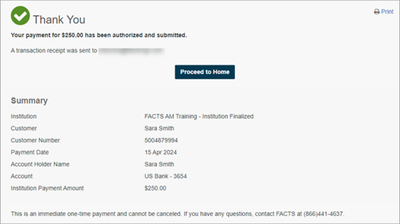
3. You're all setThat’s it! You’ll see a confirmation page letting you know your payment has been submitted. Click “Proceed to Home” and you’ll be taken back to your FACTS account where you can see your submitted payment.
|