
Use AI Search in HubHelp
| Purpose |
Learn how to use HubHelp’s AI Search to quickly find articles, videos, and answers by scanning trusted HubHelp content and highlighting the most relevant information for you. |
|---|---|
| Related Articles | Navigating HubHelp |
| Interactive Tutorial | HubHelpAI Interactive Tutorial |
Overview
HubHelpAI is the latest generative AI search tool engineered to efficiently search and generate information based on a single query using keywords and phrases. It’s meticulously designed to save time when you’re uncertain about which article to open or simply desire a quick explanation. It is crafted to answer questions by retrieving pertinent information from a comprehensive knowledge base and generating text.
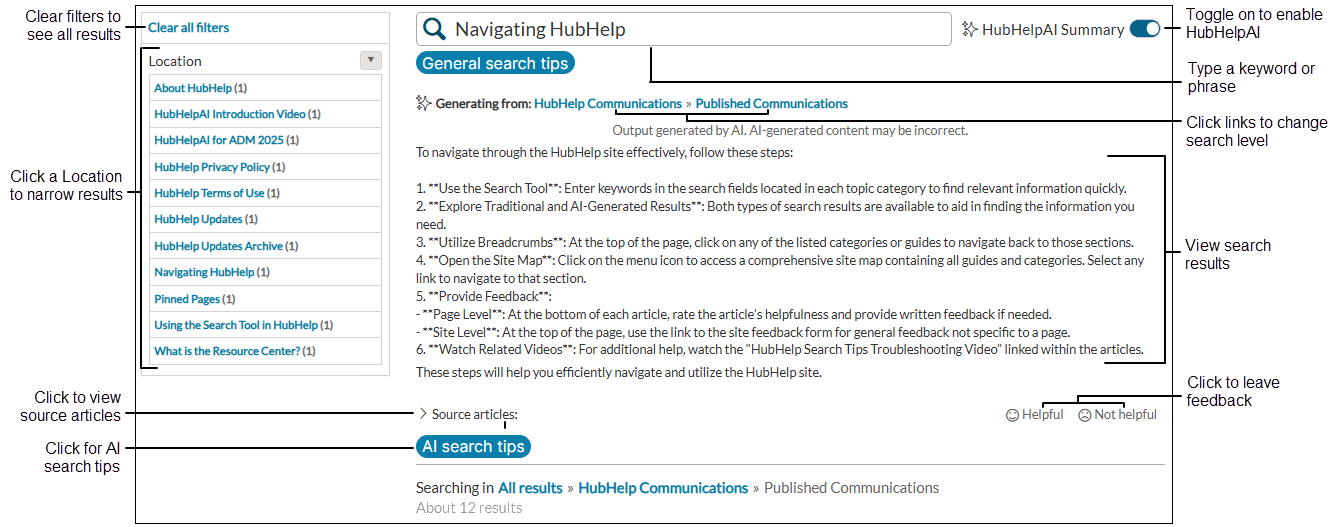
- Type the keywords or phrase in the Search field.
- Select the HubHelpAI toggle to enable generative search.
- View search results based on the keyword or phrase search.
- Click a Location to generate more detailed results and fewer locations.
- Click on Clear all filters to see all results.
- Click the links to change the search level. All results will include the entire site.
- Click AI search tips to view search tips in a pop-up window.
- Click Source articles to display the articles from which the AI result was taken.
- Click Helpful or Not helpful to provide feedback.
Start your search
Begin an AI-powered search in HubHelp and view the AI-generated summary results. Learn how to search, access the HubHelpAI Summary, and improve your search results.
Improve HubHelpAI search results
- Narrow your search by Location to improve the response relevance.
- Use key words and phrases, such as "create user account."
- Add "define", "list", or "summarize" at the front of your search to get a better response.
- Provide feedback about the response so HubHelpAI can improve.
-
Note
Each search is new and not a clarification of a previous search.
Use Location to narrow the search
Location displays places where additional information about the keyword or phrase is found. Searching within a specific location narrows the area from which the AI generates results. Each search is new and not a clarification of a previous search.
Image of Home page vs category search
Search from the HubHelp Home page.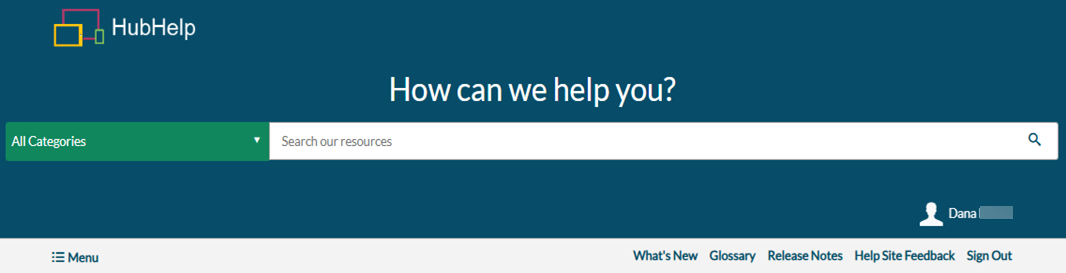
Search from a HubHelp category, for example, Published Communications.
- In the HubHelp search field, type your search term or phrase.
- Click the search icon
 or press the Enter key on your keyboard.
 - Toggle on the HubHelpAI Summary.
- Review results.
OR
Click AI search tips to learn how to improve results.
Provide Feedback
We’d love your feedback. Use HubHelpAI Summary whenever possible and share your experience to help improve future results. Written feedback is the most valuable, as it provides specific insight into what may improve and is available when a result is rated Not Helpful. All feedback is reviewed and implemented when possible, and feedback options appear with every AI search result.
Tips for feedback

| Option | Tips for feedback |
|---|---|
| Helpful | Click the Helpful icon  if you find the information accurate and useful. It turns yellow to indicate the feedback was submitted. No additional action is needed. if you find the information accurate and useful. It turns yellow to indicate the feedback was submitted. No additional action is needed. |
| Not Helpful |
Click the Not Helpful icon
|
 if you find misinformation, too much information, or insufficient information. The text changes to yellow, and a dialog box displays.