
Multi-Factor Authentication Troubleshooting FAQs for Families
| Purpose |
Review frequently asked questions and login troubleshooting guide for Multi-Factor Authentication (MFA). |
|---|---|
| Related Articles | Access the Family Portal and Multi-Factor Authentication |
| Watch a Video | Multi-Factor Authentication Setup Video |
Overview
Parents and other family individuals may use this troubleshooting and FAQ guide to get answers to common questions and issues for the new login process, account setup, and username and password requirements.
Troubleshooting
Review solutions to common MFA and login issues.
I receive errors while trying to authenticate.
Clear cache and cookies for all time. Be sure to log out of your accounts to prevent sessions from holding on, instead of simply closing out of their browser or window.
I receive an error stating "error when saving data" when attempting to connect to FACTS Financial Management or add funds to a prepay account.
Please contact FACTS Financial Management parent support.
- Parent support: 1-866-441-4637
I receive an error stating "Oops something went wrong."
- If you have not completed account creation, click the registration link in your invitation email to complete setup.
- If you have multiple user accounts for FACTS products, try using the credentials for the other account.
If the issue persists, please contact FACTS Financial Management parent support.
- Parent support: 1-866-441-4637
I receive errors when logging in through a saved bookmark.
Clear cache and cookies, then log in directly at factsmgt.com. Resave any stored bookmarks.
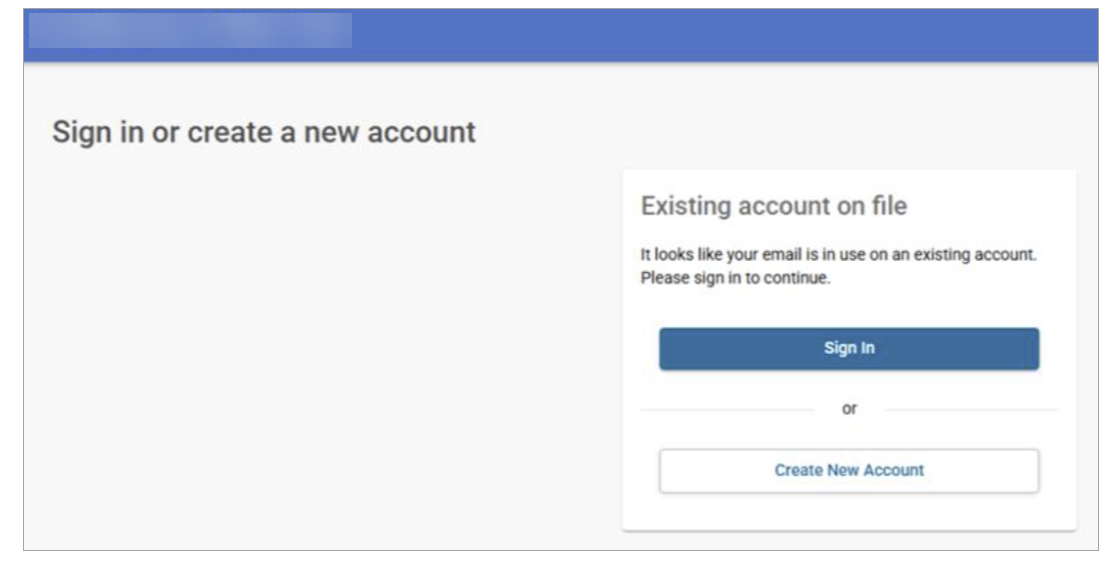
I am having difficulty starting an application.
| Steps | Example screenshots |
|---|---|
|
Click Create an Account if you are new to the school. You will receive an email account invitation to Register. |
 |
|
If the system recognizes you have an existing user account with FACTS based on the email, you will be prompted to Sign in. Once you click Save, you will be redirected to the create an application page within five seconds. |
 |
I am not receiving the MFA verification email or password reset email.
Verify that your email inbox is not inactive, or that the email is not in your spam or junk folder.
I have children at more than one FACTS school and am having trouble logging in.
MFA is designed for one login across all systems. Make sure the same email address is on all accounts so that they link, and that you are not already logged into another school in the same browser.
I entered the correct verification code, but receive an error saying it is invalid.
The following issues may cause this error:
- The code is expired
- The browser session has cached data
- The browser autofill is interfering
- You are already logged in elsewhere
Clear cache & cookies for all time.
I receive an error stating the system doesn't recognize the username when trying to log in.
Select Forgot username/password to identify if you are using the correct username.
I received an email change notification but I haven't set up an MFA account yet.
When MFA is enabled for your school it may inadvertently trigger email notifications indicating that demographic information had changed. No actual demographic data was modified.
How do I change my MFA method, username, email, or authentication questions?
- Sign in to Family Portal.
- Click on your initials.
- Select My Profile – Privacy.
You may also contact FACTS Financial Management parent support at 1-866-441-4637 for assistance.
FAQs
Below are frequently asked questions and answers about the MFA setup process, and changes to the login process.